

Assignments
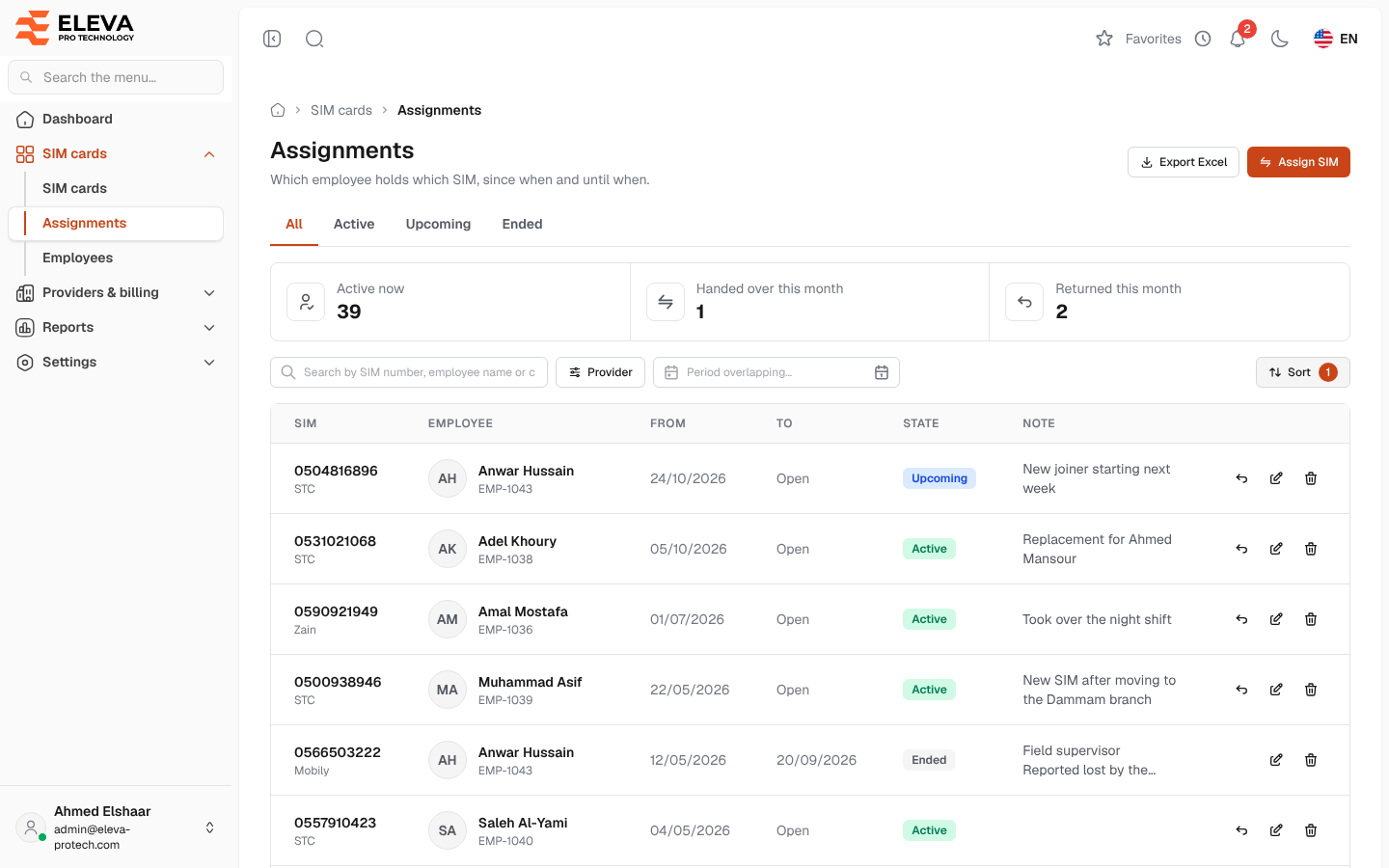
An assignment is a period during which an employee holds a SIM: from a start date to an end date, or open when it has no end yet. The Assignments screen lists every period, past, current and upcoming. Use it to see who holds which SIM, assign or hand over a SIM, return it, correct a period or export the list.
From the side menu, open SIM cards › Assignments.
What’s on this screen
Section titled “What’s on this screen”- All, Active, Upcoming and Ended: tabs that filter by state. The list opens on All.
- Summary cards: Active now, Handed over this month and Returned this month.
- Search by SIM number, employee name or code…
- Filters: Provider and Period overlapping… (a date range: the list keeps the periods that overlap it).
- Sort: Newest start first (the default), Oldest start first, Latest end first, SIM number or Employee name.
- Export Excel: downloads the list as shown.
- Assign SIM: opens the assign window. See Assign or hand over a SIM.
Columns
Section titled “Columns”- SIM: the SIM number (a link to the SIM), with the provider underneath, and Deleted SIM when the SIM was deleted since.
- Employee: the name (a link to the employee) with the employee code.
- From and To: the first and last day of the period, both included. Open when it has no end.
- State: Active (running today), Upcoming (starts after today) or Ended.
- Note
- Actions: Return SIM (periods that have not ended), Edit and Delete (only the SIM’s latest period).
The holding rules
Section titled “The holding rules”- A SIM has one holder at a time, and an employee holds one SIM at a time: two periods of the same SIM, or of the same employee, can never overlap.
- Only an Active SIM can be handed to an employee, and only to an active employee.
- Periods include both their days: a SIM returned today is free from tomorrow, and an employee whose period ends on the 24th can receive another SIM from the 25th.
How to delete an assignment recorded by mistake
Section titled “How to delete an assignment recorded by mistake”- Click the bin icon in the row. It shows only on the SIM’s latest period.
- Read Delete assignment: This will delete the assignment of … — …. Only for an assignment recorded by mistake; to end a real one, return the SIM instead. If it was a hand-over, the previous holder gets the SIM back.
- Confirm with Delete.
If the deleted period was a hand-over, the previous holder’s period is opened again and the message Deleted. The hand-over was undone: … holds the SIM again. confirms it. This happens only when the previous period still ends the day before the deleted one, that employee is still active, the SIM is still in service and the employee has not received another SIM since. Otherwise the message is Deleted.: correct the previous period by hand with Edit if needed.
Required permissions
Section titled “Required permissions”- Assignments › View to open the screen.
- Assignments › Add for Assign SIM (assign and hand over).
- Assignments › Edit for Return SIM and Edit, and Assignments › Delete for Delete.
- Assignments › Export for Export Excel.